
Training Software
Training Software
Training Software
Customer Service Training Software Comparison 2026
/ / / / / / / /
Customer service training software is a platform that helps support teams onboard, coach, assess, and improve agents through structured learning, simulations, analytics, and workflow integrations.
What Is Customer Service Training Software?
Customer service training software has evolved from static learning management systems (LMS) into AI-powered coaching and simulation platforms that let agents practise real customer conversations before handling live tickets.
In 2026, CX leaders are no longer evaluating training tools only on course completion rates. They are buying platforms to reduce onboarding time, improve CSAT, standardise policy adherence, lower QA overhead, and scale coaching across distributed teams. This shift is driven by growing support complexity and rising customer expectations. According to Salesforce’s State of Service report, 88% of service professionals say customers expect faster interactions as technology advances (Source: Salesforce, 2024: https://www.salesforce.com/resources/research-reports/state-of-service/).
Modern platforms now span several categories:
Traditional LMS systems
Video coaching tools
Knowledge management platforms
AI roleplay and simulation systems
QA and conversation intelligence software
This guide compares the leading customer service training software platforms in 2026 across:
AI simulation quality
Scenario realism
Coaching workflows
Analytics depth
Scalability
Integrations
Pricing transparency
Enterprise readiness
Test Smart Role’s AI customer support simulations
TL;DR
AI simulation platforms are replacing passive LMS-only training for frontline support teams.
Smart Role stands out for realistic AI roleplays, QA coaching workflows, and support-specific simulations.
Lessonly and Docebo remain strong for enterprise learning management and compliance training.
Buyers should prioritise integrations, analytics depth, and measurable skill improvement over course completion metrics.
Simulation-based platforms reduce onboarding and coaching overhead faster than static video-based systems.
Customer service training software now sits much closer to operational performance management than traditional HR learning systems. In many organisations, support enablement teams work directly with QA leaders, workforce management teams, and CX operations managers to align training with measurable business outcomes.
For example, a modern support training programme may connect:
Ticket QA scores
Escalation trends
Average handling time
CSAT feedback
Compliance audit performance
Coaching completion rates
This operational alignment is one reason AI simulation platforms are growing quickly. Enterprises increasingly want to identify skill gaps before agents negatively impact customer experience metrics.
A typical support onboarding journey in 2026 may include:
Product and policy education through LMS modules
Interactive workflow walkthroughs
AI roleplay simulations across chat, email, and voice
QA-reviewed practice conversations
Supervisor calibration sessions
Live customer readiness certification
This blended model combines traditional learning management with applied behavioural training.
The market is also expanding because customer support itself has become more complex. Agents are now expected to:
Navigate multiple SaaS systems simultaneously
Handle subscription and billing complexity
Support omnichannel interactions
Manage AI-assisted workflows
Maintain compliance standards
Deliver emotionally intelligent customer experiences
As a result, many companies are reassessing whether static onboarding methods are sufficient for modern support operations.
How We Evaluated the Best Customer Service Training Software
The customer service training software market has become crowded. Many vendors now claim AI capabilities, but the actual functionality varies widely. Some platforms use AI only for quiz generation or content recommendations. Others provide realistic roleplay simulations with adaptive customer responses and performance scoring.
To create this comparison, we evaluated platforms across operational, technical, and coaching criteria relevant to modern CX teams.
Why Simulation-Based Training Matters in 2026
Traditional support onboarding relied heavily on:
SOP documents
Recorded webinars
LMS quizzes
Shadowing senior agents
These methods help transfer knowledge, but they do not consistently build behavioural skills. Support performance depends on:
Empathy
De-escalation
Objection handling
Policy application
Escalation judgement
Tone management
Simulation-based systems allow agents to practise these skills repeatedly in realistic environments before speaking to customers.
McKinsey reports that organisations using AI-enabled customer care workflows are increasingly focusing on augmentation and coaching rather than automation alone (Source: McKinsey, 2024: https://www.mckinsey.com/capabilities/operations/our-insights/the-state-of-ai-in-customer-care).
For customer support organisations, this changes the economics of onboarding:
Faster ramp times
More consistent QA outcomes
Lower supervisor coaching load
Better readiness for edge-case conversations
Simulation systems are especially useful in industries where support interactions carry operational or regulatory risk. Examples include:
Fintech and banking support
Healthcare administration
Telecommunications
Ecommerce dispute handling
Travel and hospitality disruptions
Insurance claims support
In these environments, an agent mistake can create:
Compliance exposure
Refund leakage
Customer churn
Escalation costs
Reputational damage
Training leaders therefore increasingly look for systems that measure judgement and communication quality, not just knowledge recall.
Another major trend is the rise of asynchronous and remote onboarding. Distributed support teams often struggle to maintain coaching consistency because supervisors cannot monitor every live interaction during onboarding.
Simulation-based systems help standardise practice opportunities by allowing every agent to:
Experience the same core scenarios
Receive structured feedback
Train independently
Practise repeatedly without affecting customers
This consistency becomes critical for enterprise support organisations operating across:
Multiple time zones
Outsourced BPO partners
Regional compliance environments
Different languages and product lines
The Difference Between LMS Platforms and AI Roleplay Systems
Most training tools still fall into one of four categories:
Category | Primary Purpose | Strengths | Weaknesses |
|---|---|---|---|
Traditional LMS | Course delivery | Compliance, certifications | Passive learning |
Video coaching tools | Recorded feedback | Manager reviews | Limited interactivity |
Conversation intelligence | Analyse live interactions | QA insights | Reactive rather than proactive |
AI simulation platforms | Realistic practice | Behavioural skill development | Newer category |
Traditional LMS systems remain useful for:
Compliance training
Documentation
Structured onboarding
Policy certifications
But they often struggle with practical skill development. Watching a video on handling an angry customer is fundamentally different from managing one in a live simulation.
AI simulation platforms like Smart Role focus on active learning:
Branching conversations
Real-time feedback
Omnichannel simulations
QA scorecards
Coaching recommendations
This is increasingly important for remote and hybrid support teams where live shadowing opportunities are limited.
A useful way to understand the difference is to compare knowledge acquisition versus skill execution.
LMS platforms primarily answer:
Has the employee viewed the material?
Did they pass the assessment?
Has the certification expired?
Which content modules were completed?
Simulation systems answer:
Can the agent apply policy under pressure?
How do they react when a customer escalates emotionally?
Can they maintain compliance while de-escalating?
Are they making correct judgement calls?
Which behaviours consistently lead to poor outcomes?
Many organisations now use both systems together:
LMS for foundational education
Simulation systems for behavioural readiness
QA tools for live interaction evaluation
Knowledge bases for ongoing support
This layered enablement approach is becoming the operational standard in larger CX environments.
Evaluation Criteria Explained
We weighted platforms across the following criteria:
AI simulation capabilities
Adaptive conversations
Realistic customer personas
Branching logic
Tone analysis
Dynamic responses
Real-world practice environments
Email simulations
Chat simulations
Voice roleplays
Escalation workflows
Omnichannel scenarios
Analytics depth
QA scoring
Behavioural trend analysis
Coaching recommendations
Performance benchmarking
Scalability
Enterprise deployment support
Multi-team management
Global workforce support
BPO readiness
Integration ecosystem
CRM integrations
Help desk integrations
HRIS support
API flexibility
Pricing transparency
Public pricing availability
Implementation costs
AI usage fees
Seat minimums
Time-to-value
Deployment speed
Content setup complexity
Admin overhead
Coaching workflows
Manager review tools
Automated feedback
QA calibration support
We also evaluated whether platforms genuinely improved support readiness or simply digitised static training materials.
Additional operational considerations included:
Ease of scenario authoring
Reporting usability for managers
Support for multilingual coaching
Workflow customisation flexibility
Vendor implementation maturity
Ability to support seasonal onboarding surges
In practice, the “best” platform often depends on organisational maturity.
For example:
A 30-person ecommerce support team may prioritise speed and affordability.
A multinational BPO may prioritise multilingual simulations and QA calibration.
A regulated fintech operation may prioritise auditability and compliance tracking.
A fast-scaling SaaS company may prioritise onboarding velocity and workflow integrations.
This comparison therefore focuses not only on features, but on operational fit.
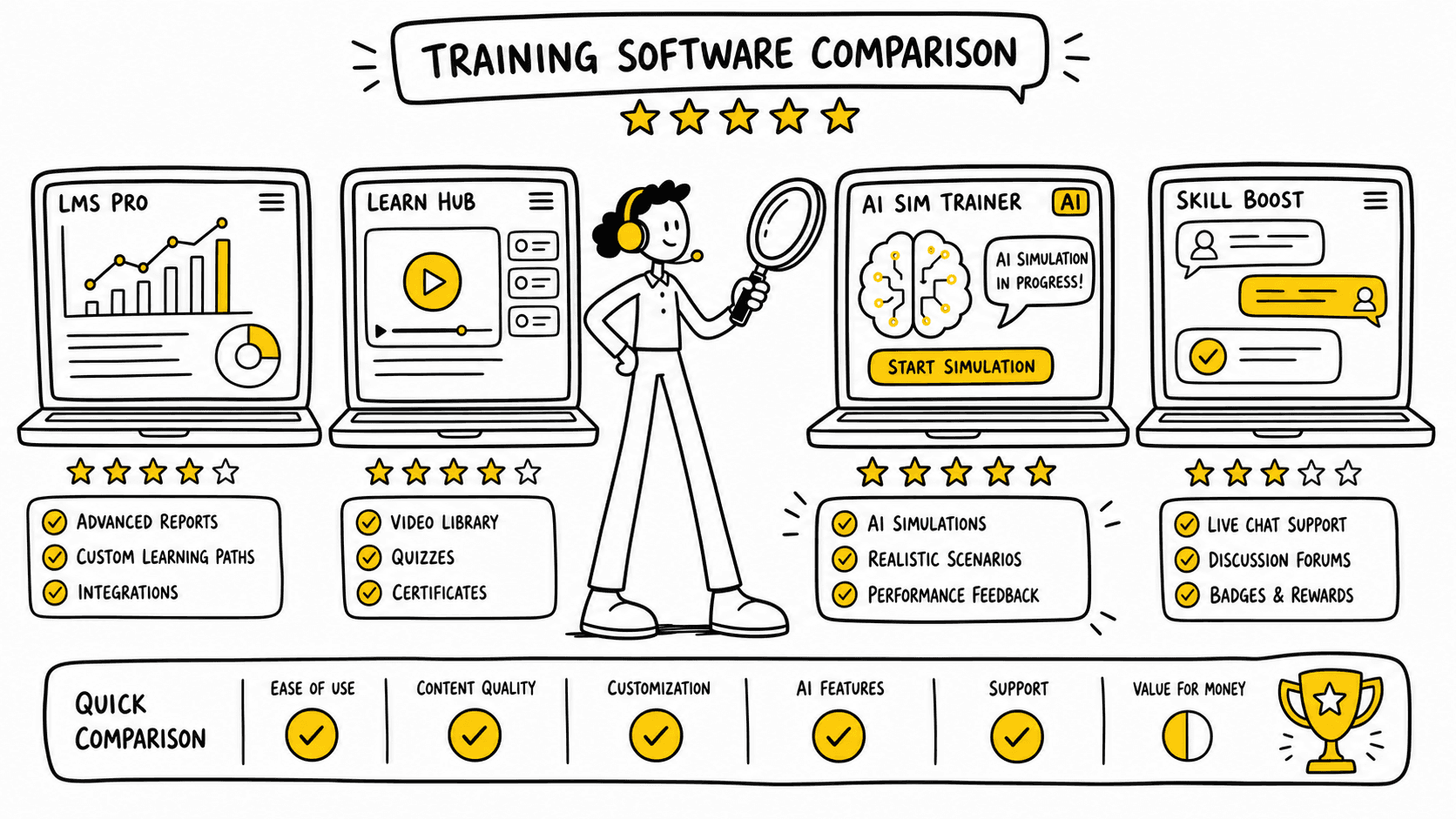
Quick comparison table: Top Customer Service Training Platforms in 2026
The platforms below represent different approaches to customer service training. Some focus on enterprise learning management. Others specialise in workflow enablement or AI simulations.
Platform | Best For | AI Simulation | Scenario Realism | QA Analytics | Integrations | Enterprise Scalability | Pricing Transparency | Free Trial/Demo |
|---|---|---|---|---|---|---|---|---|
Smart Role | AI-powered support training | Advanced | Excellent | Advanced | Strong CX stack | Excellent | Demo-based | Yes |
Lessonly by Seismic | Structured enterprise learning | Moderate | Moderate | Good | Strong | Excellent | Quote-based | Demo |
Docebo | Enterprise LMS ecosystems | Moderate | Moderate | Good | Extensive | Excellent | Quote-based | Trial |
iSpring Learn | Budget-friendly LMS | Limited | Basic | Basic | Moderate | Good | Public pricing | Trial |
Zendesk Training | Zendesk-centric enablement | Basic | Basic | Moderate | Native Zendesk | Good | Limited | Demo |
Trainual | SOP and process training | Limited | Low | Basic | Moderate | SMB-focused | Public pricing | Trial |
TalentLMS | Fast deployment LMS | Limited | Basic | Moderate | Strong SMB ecosystem | Good | Public pricing | Trial |
Spekit | In-workflow enablement | AI guidance | Low | Basic | Strong GTM integrations | Moderate | Quote-based | Demo |
Second Nature | AI conversational roleplay | Advanced | Good | Moderate | Sales-focused | Moderate | Quote-based | Demo |
When comparing platforms, buyers should avoid evaluating feature lists in isolation. Two vendors may both advertise:
AI coaching
Analytics
Scenario training
Workflow integrations
Yet deliver very different operational experiences.
For example, some platforms treat roleplay as a lightweight add-on with scripted prompts, while others build adaptive simulations capable of:
Changing customer tone dynamically
Introducing policy edge cases
Testing escalation judgement
Simulating multi-turn conversations
Scoring soft skills automatically
Similarly, “analytics” can range from basic completion tracking to detailed behavioural benchmarking across thousands of interactions.
A practical evaluation framework is to separate tools into three operational layers:
Knowledge management
Behavioural practice
Performance coaching
Most legacy LMS platforms remain strongest in layer one. Simulation-first platforms increasingly compete in layers two and three.
Best Overall for AI-Powered Customer Support Simulations
Smart Role is the strongest option for organisations prioritising:
Behavioural skill development
AI-driven roleplays
QA automation
Support-specific workflows
BPO scalability
Its core differentiator is simulation realism. Instead of generic roleplay prompts, teams can create customer scenarios tied to actual workflows, policies, and escalation paths.
This matters because support quality is heavily context dependent. Generic training rarely captures:
Complex refunds
Compliance-sensitive workflows
Escalation handling
Tone management under pressure
Smart Role also combines simulations with coaching and QA workflows, reducing the operational fragmentation common in legacy stacks.
See AI customer support simulations in action
In enterprise support environments, fragmented tooling often creates operational friction:
LMS for onboarding
Separate QA software
Manual coaching spreadsheets
Static SOP documentation
Ad hoc calibration reviews
Simulation-first systems attempt to centralise more of the coaching workflow.
For example, a support manager could:
Identify recurring QA failures
Launch targeted simulations
Benchmark team performance
Deliver automated feedback
Reassess improvement trends
This creates a more continuous learning loop compared with quarterly or manual coaching cycles.
Best Traditional LMS for Enterprise Training
Lessonly by Seismic and Docebo remain strong choices for:
Compliance-heavy industries
Structured learning paths
Enterprise certification workflows
Large-scale content management
These systems are mature, scalable, and widely adopted. However, their simulation capabilities are less advanced than dedicated AI roleplay platforms.
A major advantage of traditional LMS systems is governance maturity. Large enterprises often require:
Certification expiration tracking
Formal audit logs
Department-level permissions
Mandatory learning pathways
HRIS synchronisation
These capabilities remain highly important in regulated industries.
Many organisations therefore continue to use LMS systems as their foundational learning infrastructure while layering simulation systems on top for behavioural coaching.
Best Lightweight Training Platform for SMB Teams
TalentLMS, iSpring Learn, and Trainual offer:
Lower entry pricing
Faster setup
Simpler admin workflows
These platforms are well suited to smaller support teams that need:
Basic onboarding
SOP distribution
Knowledge tracking
However, they generally lack:
Realistic simulations
Deep QA analytics
Behavioural coaching systems
For many SMBs, simplicity matters more than advanced AI functionality. Teams with limited enablement resources often prioritise:
Easy content creation
Low maintenance
Quick rollout
Minimal implementation support
These platforms can deliver strong value when operational complexity remains manageable.
Editorial observations:
AI capability claims vary significantly between vendors.
Most LMS platforms still prioritise content management over skill practice.
Pricing transparency remains inconsistent in the enterprise segment.
Integration maturity matters more than feature count for operational adoption.
Simulation-first platforms are emerging as a distinct category rather than a subset of LMS software.
Another notable trend is that procurement ownership is shifting. Historically, LMS buying decisions were often HR-led. In 2026, customer service training platforms are increasingly evaluated by:
CX operations leaders
Support enablement managers
QA directors
BPO operations teams
Customer experience executives
This operational ownership changes evaluation priorities toward measurable support outcomes rather than learning administration alone.
Best Customer Service Training Software Platforms Reviewed
This section provides practical buyer-focused reviews based on support use cases, implementation maturity, and coaching functionality. Each platform serves different operational priorities.
Smart Role — Best AI Simulation Platform for Customer Support Teams
Smart Role is built specifically for customer support training through AI-driven simulations, coaching, and QA automation.
Unlike traditional LMS systems that focus on static course delivery, Smart Role centres training around realistic customer interactions. Agents practise conversations in simulated environments and receive structured feedback tied to support performance metrics.
Best for:
Enterprise support teams
BPOs
High-volume CX organisations
Remote and distributed teams
QA-heavy environments
Key features:
AI customer roleplay simulations
Omnichannel scenarios
Branching conversation logic
Real-time coaching feedback
QA scorecards
Performance benchmarking
Scenario libraries
Workflow-specific training paths
Manager calibration tools
One of Smart Role’s strongest differentiators is scenario realism. Teams can train agents on:
Refund disputes
Escalations
Billing issues
Compliance conversations
Angry customers
Cross-functional handoffs
High-emotion interactions
The platform allows organisations to mirror their actual support operations rather than relying on generic scripts.
This is important because customer support performance is contextual. Agents need practice applying policies under pressure, not just memorising documentation.
AI simulation capabilities:
Smart Role’s AI adapts dynamically during simulations. Customer personas respond differently based on:
Tone
Policy decisions
Escalation handling
Empathy
Resolution quality
Managers can score:
Compliance adherence
Soft skills
Resolution accuracy
Escalation judgement
Customer communication quality
The platform also supports scalable coaching workflows:
Automated QA feedback
Trend reporting
Skill gap analysis
Coaching recommendations
Team benchmarking
This creates a continuous enablement loop rather than one-time onboarding.
Integration ecosystem:
Smart Role integrates with:
Zendesk
Salesforce
Intercom
HubSpot
Freshdesk
CRM systems
QA tools
Internal knowledge bases
These integrations help training scenarios reflect real operational workflows.
Scalability:
The platform is particularly strong for:
Global support teams
BPO environments
Multi-brand operations
High agent turnover environments
Multilingual simulation support is increasingly important as support organisations expand internationally.
Analytics:
Many LMS systems stop at completion tracking. Smart Role focuses on behavioural analytics:
QA trends
Coaching impact
Escalation handling quality
Scenario pass rates
Readiness scoring
This aligns more closely with actual support KPIs.
A practical implementation example might include:
Week 1: Product and policy onboarding
Week 2: Guided AI simulations
Week 3: Escalation and edge-case practice
Week 4: Certification simulations tied to QA standards
Managers can then compare simulated performance against live QA data to identify onboarding gaps.
Another advantage is calibration support. Large support organisations often struggle with scoring consistency across managers and QA analysts. Simulation systems help standardise expectations by allowing reviewers to assess the same interactions and align scoring frameworks.
Operationally, this can improve:
Coaching consistency
Agent confidence
Audit preparedness
Escalation management
Supervisor efficiency
Pros:
Highly realistic simulations
Support-specific workflows
Strong QA integration
Coaching automation
Faster practical onboarding
Good fit for distributed teams
Cons:
Less focused on traditional compliance certifications
Enterprise-focused pricing model
Requires thoughtful scenario setup for maximum value
Pricing transparency:
Pricing is customised based on:
Team size
AI usage
Integration complexity
Deployment scope
Ideal buyer profile:
Smart Role is best suited to CX organisations prioritising measurable support readiness and coaching efficiency over static course administration.
Book a Smart Role test drive to evaluate AI simulations with your own workflows.
Lessonly by Seismic — Best for Structured Enterprise Learning
Lessonly by Seismic remains one of the most established enterprise training platforms.
It combines LMS functionality with coaching workflows and structured learning paths.
Best for:
Enterprise onboarding
Compliance-heavy industries
Large internal enablement programmes
Key features:
Course management
Certifications
Learning paths
Practice exercises
Manager coaching tools
Analytics dashboards
Lessonly is particularly strong for organisations that need:
Standardised onboarding
Formal learning governance
Large-scale content administration
The platform’s roleplay capabilities exist but are less advanced than dedicated AI simulation systems.
Lessonly is commonly adopted by enterprises that already have mature enablement teams and formal learning operations. These organisations often require:
Structured curricula
Department-based learning paths
Role-specific certifications
Cross-functional onboarding
A support organisation using Lessonly may create separate tracks for:
Tier 1 support
Technical support
Billing operations
Escalation teams
Team leaders
The platform’s strength lies in administrating these programmes at scale.
Pros:
Mature enterprise LMS
Strong reporting
Scalable administration
Good compliance support
Cons:
Simulations are relatively lightweight
Less support-specific than Smart Role
Pricing is not publicly transparent
Integrations:
Salesforce
Zendesk
Slack
Seismic ecosystem
Pricing:
Quote-based enterprise pricing.
Ideal buyer profile:
Large enterprises prioritising structured learning management over advanced behavioural simulations.
Docebo — Best AI-Enhanced LMS Ecosystem
Docebo is a comprehensive LMS platform with growing AI functionality.
It is widely used for employee onboarding, customer education, and enterprise learning management.
Best for:
Large enterprises
Multi-department learning ecosystems
Extended enterprise training
Key features:
AI content tagging
Learning automation
Certification workflows
Mobile learning
Reporting dashboards
Docebo’s AI functionality focuses more on content management and recommendations than immersive support simulations.
Docebo is especially attractive for organisations managing multiple learning audiences:
Employees
Contractors
Partners
Customers
Franchise networks
This flexibility makes it useful for companies wanting a unified learning ecosystem across departments.
Pros:
Strong enterprise scalability
Extensive integrations
Mature LMS governance
Broad use-case flexibility
Cons:
Limited simulation realism
More complex administration
Higher implementation overhead
Integrations:
Salesforce
Microsoft Teams
Zoom
HRIS systems
API ecosystem
Pricing:
Enterprise quote-based pricing.
Ideal buyer profile:
Organisations needing a broad enterprise LMS rather than support-specific coaching infrastructure.
iSpring Learn — Best Budget-Friendly LMS
iSpring Learn is a practical LMS for small and mid-sized support teams.
Its strengths are simplicity, affordability, and rapid deployment.
Best for:
SMBs
Fast onboarding
Budget-conscious teams
Key features:
Course management
Mobile learning
Quizzes
Reporting
SCORM support
The platform works well for:
SOP training
Product education
Compliance basics
However, AI coaching and realistic simulations remain limited.
One advantage of iSpring Learn is accessibility for teams without dedicated enablement administrators. Many SMB support organisations need systems that supervisors can manage without extensive technical training.
Pros:
Easy setup
Transparent pricing
Good usability
Fast deployment
Cons:
Limited AI capabilities
Basic analytics
Less suitable for enterprise coaching
Pricing:
Public pricing available per user per month.
Ideal buyer profile:
Smaller teams needing straightforward onboarding without advanced behavioural coaching.
Zendesk Training — Best for Zendesk-Centric Teams
Zendesk offers training and enablement capabilities tied closely to its customer support ecosystem.
Best for:
Existing Zendesk customers
Support workflow alignment
Ticketing-centric operations
Key features:
Knowledge base integration
Workflow training
Support process enablement
Reporting
The biggest advantage is ecosystem alignment.
For teams already operating entirely within Zendesk, native alignment can reduce implementation friction. Managers can train agents directly against:
Existing macros
Ticket workflows
Help centre structures
Escalation processes
Pros:
Native Zendesk compatibility
Familiar interface
Useful operational context
Cons:
Limited AI simulation depth
Less flexible outside Zendesk ecosystem
Training functionality is narrower than dedicated LMS platforms
Pricing:
Varies based on Zendesk suite plans.
Ideal buyer profile:
Support teams heavily invested in Zendesk workflows.
TalentLMS — Best for Fast Deployment
TalentLMS focuses on simplicity and rapid rollout.
Best for:
Growing SMBs
Fast implementation
Distributed onboarding
Key features:
Learning paths
Assessments
Gamification
Mobile access
Reporting
The platform balances usability and affordability effectively.
TalentLMS is frequently chosen by fast-growing support teams because implementation can happen quickly without major consulting support. This matters for organisations scaling customer support rapidly after funding rounds or expansion periods.
Pros:
Quick deployment
Intuitive admin experience
Public pricing
Good SMB scalability
Cons:
Limited AI coaching
Basic scenario functionality
Less advanced analytics
Pricing:
Tiered public pricing.
Ideal buyer profile:
Mid-sized support organisations seeking operational simplicity.
Trainual — Best for Process Documentation
Trainual is primarily a process documentation and SOP training platform.
Best for:
Operational playbooks
Internal documentation
Small business onboarding
Key features:
SOP management
Process documentation
Knowledge organisation
Training tracking
Pros:
Very easy to use
Strong documentation workflows
Fast implementation
Cons:
Weak simulation functionality
Minimal behavioural coaching
Limited enterprise analytics
Pricing:
Public SMB-focused pricing.
Ideal buyer profile:
Smaller operations prioritising process consistency over advanced coaching.
Trainual works particularly well for organisations where support processes change frequently and documentation maintenance is a major operational challenge. Teams can centralise:
Process updates
Escalation flows
Product procedures
Internal FAQs
However, the platform is less capable when behavioural coaching becomes the primary requirement.
Spekit — Best In-Workflow Learning
Spekit focuses on contextual enablement inside daily workflows.
Best for:
Embedded guidance
Workflow adoption
Real-time enablement
Key features:
In-app guidance
Knowledge overlays
Workflow prompts
Contextual learning
Pros:
Strong workflow integration
Reduces knowledge searching
Useful for tool adoption
Cons:
Not a full training platform
Limited simulation capability
Weak support-specific roleplays
Pricing:
Quote-based.
Ideal buyer profile:
Teams needing workflow guidance rather than structured support simulations.
Spekit is often deployed alongside broader enablement platforms rather than replacing them entirely. It helps reduce friction during live work by surfacing contextual guidance directly inside operational systems.
Second Nature — Best for AI Sales Roleplay Adapted to Support
Second Nature specialises in AI conversational roleplay, originally built for sales enablement.
Best for:
Conversational practice
Soft skill coaching
AI roleplay
Key features:
AI personas
Feedback scoring
Conversation practice
Coaching analytics
Pros:
Strong conversational AI
Practical skill practice
Good feedback workflows
Cons:
Less support-specific
Fewer CX workflow integrations
More sales-oriented use cases
Pricing:
Enterprise quote-based pricing.
Ideal buyer profile:
Teams prioritising conversational coaching over operational support workflows.
Some support organisations adapt sales roleplay systems successfully for customer service soft-skill development. However, operational depth can become a limitation when workflows involve:
Refund logic
Escalation matrices
Compliance scripts
Multi-system troubleshooting
Other Notable Platforms
Additional tools buyers may evaluate include:
Litmos
Absorb LMS
LearnUpon
WorkRamp
Kahoot! 360
MaestroQA
These platforms vary in focus:
Compliance learning
Employee onboarding
QA management
Knowledge enablement
However, relatively few combine:
AI simulations
QA workflows
Coaching automation
CX-specific practice environments
This convergence is where simulation-first platforms are increasingly differentiating themselves.
Another category worth monitoring is conversation intelligence software expanding into coaching automation. Some QA vendors are beginning to add:
Practice environments
AI coaching prompts
Readiness scoring
Behavioural benchmarking
The boundaries between LMS, QA, and simulation software are therefore becoming less distinct.ZZBold: Frequently Asked Questions
What is the best customer service training software in 2026?
The best customer service training software depends on your team's primary need. For AI simulation and agent readiness verification, Smart Role leads with realistic roleplay scenarios across chat, email, and voice. For enterprise LMS compliance and certification tracking, Docebo and Lessonly (Seismic Learning) remain strong. For QA-driven coaching workflows, look at platforms combining conversation intelligence with targeted practice modules.
How much does customer service training software cost?
Pricing ranges from $15 per user per month for basic LMS platforms to $50+ per user per month for enterprise AI simulation systems. Most vendors offer volume discounts for large support teams. Free trials or pilot programs are common, so teams can validate ROI before committing to annual contracts.
Can AI roleplay training replace a traditional LMS?
AI roleplay platforms complement rather than replace traditional LMS systems. The LMS handles knowledge transfer, policy documentation, compliance certifications, and structured curricula. AI roleplay systems verify whether agents can apply that knowledge under realistic pressure. The most effective training programs use both: LMS for learning, simulation for proving readiness.
What features should I look for in customer service training software?
Prioritize: AI simulation quality and scenario realism, omnichannel support (chat, email, voice), integration with your helpdesk and QA tools, analytics that measure skill improvement over time (not just completion rates), coaching workflow automation, scalability across distributed or BPO teams, and measurable onboarding time reduction.
How do I measure ROI from customer service training software?
Track onboarding time to proficiency, QA score improvement post-training, reduction in escalation rates, CSAT changes for recently trained agents, coaching hours saved per supervisor, and nesting pass rates. The strongest platforms provide built-in analytics dashboards connecting training activity to operational outcomes.
Customer service training software is a platform that helps support teams onboard, coach, assess, and improve agents through structured learning, simulations, analytics, and workflow integrations.
What Is Customer Service Training Software?
Customer service training software has evolved from static learning management systems (LMS) into AI-powered coaching and simulation platforms that let agents practise real customer conversations before handling live tickets.
In 2026, CX leaders are no longer evaluating training tools only on course completion rates. They are buying platforms to reduce onboarding time, improve CSAT, standardise policy adherence, lower QA overhead, and scale coaching across distributed teams. This shift is driven by growing support complexity and rising customer expectations. According to Salesforce’s State of Service report, 88% of service professionals say customers expect faster interactions as technology advances (Source: Salesforce, 2024: https://www.salesforce.com/resources/research-reports/state-of-service/).
Modern platforms now span several categories:
Traditional LMS systems
Video coaching tools
Knowledge management platforms
AI roleplay and simulation systems
QA and conversation intelligence software
This guide compares the leading customer service training software platforms in 2026 across:
AI simulation quality
Scenario realism
Coaching workflows
Analytics depth
Scalability
Integrations
Pricing transparency
Enterprise readiness
Test Smart Role’s AI customer support simulations
TL;DR
AI simulation platforms are replacing passive LMS-only training for frontline support teams.
Smart Role stands out for realistic AI roleplays, QA coaching workflows, and support-specific simulations.
Lessonly and Docebo remain strong for enterprise learning management and compliance training.
Buyers should prioritise integrations, analytics depth, and measurable skill improvement over course completion metrics.
Simulation-based platforms reduce onboarding and coaching overhead faster than static video-based systems.
Customer service training software now sits much closer to operational performance management than traditional HR learning systems. In many organisations, support enablement teams work directly with QA leaders, workforce management teams, and CX operations managers to align training with measurable business outcomes.
For example, a modern support training programme may connect:
Ticket QA scores
Escalation trends
Average handling time
CSAT feedback
Compliance audit performance
Coaching completion rates
This operational alignment is one reason AI simulation platforms are growing quickly. Enterprises increasingly want to identify skill gaps before agents negatively impact customer experience metrics.
A typical support onboarding journey in 2026 may include:
Product and policy education through LMS modules
Interactive workflow walkthroughs
AI roleplay simulations across chat, email, and voice
QA-reviewed practice conversations
Supervisor calibration sessions
Live customer readiness certification
This blended model combines traditional learning management with applied behavioural training.
The market is also expanding because customer support itself has become more complex. Agents are now expected to:
Navigate multiple SaaS systems simultaneously
Handle subscription and billing complexity
Support omnichannel interactions
Manage AI-assisted workflows
Maintain compliance standards
Deliver emotionally intelligent customer experiences
As a result, many companies are reassessing whether static onboarding methods are sufficient for modern support operations.
How We Evaluated the Best Customer Service Training Software
The customer service training software market has become crowded. Many vendors now claim AI capabilities, but the actual functionality varies widely. Some platforms use AI only for quiz generation or content recommendations. Others provide realistic roleplay simulations with adaptive customer responses and performance scoring.
To create this comparison, we evaluated platforms across operational, technical, and coaching criteria relevant to modern CX teams.
Why Simulation-Based Training Matters in 2026
Traditional support onboarding relied heavily on:
SOP documents
Recorded webinars
LMS quizzes
Shadowing senior agents
These methods help transfer knowledge, but they do not consistently build behavioural skills. Support performance depends on:
Empathy
De-escalation
Objection handling
Policy application
Escalation judgement
Tone management
Simulation-based systems allow agents to practise these skills repeatedly in realistic environments before speaking to customers.
McKinsey reports that organisations using AI-enabled customer care workflows are increasingly focusing on augmentation and coaching rather than automation alone (Source: McKinsey, 2024: https://www.mckinsey.com/capabilities/operations/our-insights/the-state-of-ai-in-customer-care).
For customer support organisations, this changes the economics of onboarding:
Faster ramp times
More consistent QA outcomes
Lower supervisor coaching load
Better readiness for edge-case conversations
Simulation systems are especially useful in industries where support interactions carry operational or regulatory risk. Examples include:
Fintech and banking support
Healthcare administration
Telecommunications
Ecommerce dispute handling
Travel and hospitality disruptions
Insurance claims support
In these environments, an agent mistake can create:
Compliance exposure
Refund leakage
Customer churn
Escalation costs
Reputational damage
Training leaders therefore increasingly look for systems that measure judgement and communication quality, not just knowledge recall.
Another major trend is the rise of asynchronous and remote onboarding. Distributed support teams often struggle to maintain coaching consistency because supervisors cannot monitor every live interaction during onboarding.
Simulation-based systems help standardise practice opportunities by allowing every agent to:
Experience the same core scenarios
Receive structured feedback
Train independently
Practise repeatedly without affecting customers
This consistency becomes critical for enterprise support organisations operating across:
Multiple time zones
Outsourced BPO partners
Regional compliance environments
Different languages and product lines
The Difference Between LMS Platforms and AI Roleplay Systems
Most training tools still fall into one of four categories:
Category | Primary Purpose | Strengths | Weaknesses |
|---|---|---|---|
Traditional LMS | Course delivery | Compliance, certifications | Passive learning |
Video coaching tools | Recorded feedback | Manager reviews | Limited interactivity |
Conversation intelligence | Analyse live interactions | QA insights | Reactive rather than proactive |
AI simulation platforms | Realistic practice | Behavioural skill development | Newer category |
Traditional LMS systems remain useful for:
Compliance training
Documentation
Structured onboarding
Policy certifications
But they often struggle with practical skill development. Watching a video on handling an angry customer is fundamentally different from managing one in a live simulation.
AI simulation platforms like Smart Role focus on active learning:
Branching conversations
Real-time feedback
Omnichannel simulations
QA scorecards
Coaching recommendations
This is increasingly important for remote and hybrid support teams where live shadowing opportunities are limited.
A useful way to understand the difference is to compare knowledge acquisition versus skill execution.
LMS platforms primarily answer:
Has the employee viewed the material?
Did they pass the assessment?
Has the certification expired?
Which content modules were completed?
Simulation systems answer:
Can the agent apply policy under pressure?
How do they react when a customer escalates emotionally?
Can they maintain compliance while de-escalating?
Are they making correct judgement calls?
Which behaviours consistently lead to poor outcomes?
Many organisations now use both systems together:
LMS for foundational education
Simulation systems for behavioural readiness
QA tools for live interaction evaluation
Knowledge bases for ongoing support
This layered enablement approach is becoming the operational standard in larger CX environments.
Evaluation Criteria Explained
We weighted platforms across the following criteria:
AI simulation capabilities
Adaptive conversations
Realistic customer personas
Branching logic
Tone analysis
Dynamic responses
Real-world practice environments
Email simulations
Chat simulations
Voice roleplays
Escalation workflows
Omnichannel scenarios
Analytics depth
QA scoring
Behavioural trend analysis
Coaching recommendations
Performance benchmarking
Scalability
Enterprise deployment support
Multi-team management
Global workforce support
BPO readiness
Integration ecosystem
CRM integrations
Help desk integrations
HRIS support
API flexibility
Pricing transparency
Public pricing availability
Implementation costs
AI usage fees
Seat minimums
Time-to-value
Deployment speed
Content setup complexity
Admin overhead
Coaching workflows
Manager review tools
Automated feedback
QA calibration support
We also evaluated whether platforms genuinely improved support readiness or simply digitised static training materials.
Additional operational considerations included:
Ease of scenario authoring
Reporting usability for managers
Support for multilingual coaching
Workflow customisation flexibility
Vendor implementation maturity
Ability to support seasonal onboarding surges
In practice, the “best” platform often depends on organisational maturity.
For example:
A 30-person ecommerce support team may prioritise speed and affordability.
A multinational BPO may prioritise multilingual simulations and QA calibration.
A regulated fintech operation may prioritise auditability and compliance tracking.
A fast-scaling SaaS company may prioritise onboarding velocity and workflow integrations.
This comparison therefore focuses not only on features, but on operational fit.
Quick comparison table: Top Customer Service Training Platforms in 2026
The platforms below represent different approaches to customer service training. Some focus on enterprise learning management. Others specialise in workflow enablement or AI simulations.
Platform | Best For | AI Simulation | Scenario Realism | QA Analytics | Integrations | Enterprise Scalability | Pricing Transparency | Free Trial/Demo |
|---|---|---|---|---|---|---|---|---|
Smart Role | AI-powered support training | Advanced | Excellent | Advanced | Strong CX stack | Excellent | Demo-based | Yes |
Lessonly by Seismic | Structured enterprise learning | Moderate | Moderate | Good | Strong | Excellent | Quote-based | Demo |
Docebo | Enterprise LMS ecosystems | Moderate | Moderate | Good | Extensive | Excellent | Quote-based | Trial |
iSpring Learn | Budget-friendly LMS | Limited | Basic | Basic | Moderate | Good | Public pricing | Trial |
Zendesk Training | Zendesk-centric enablement | Basic | Basic | Moderate | Native Zendesk | Good | Limited | Demo |
Trainual | SOP and process training | Limited | Low | Basic | Moderate | SMB-focused | Public pricing | Trial |
TalentLMS | Fast deployment LMS | Limited | Basic | Moderate | Strong SMB ecosystem | Good | Public pricing | Trial |
Spekit | In-workflow enablement | AI guidance | Low | Basic | Strong GTM integrations | Moderate | Quote-based | Demo |
Second Nature | AI conversational roleplay | Advanced | Good | Moderate | Sales-focused | Moderate | Quote-based | Demo |
When comparing platforms, buyers should avoid evaluating feature lists in isolation. Two vendors may both advertise:
AI coaching
Analytics
Scenario training
Workflow integrations
Yet deliver very different operational experiences.
For example, some platforms treat roleplay as a lightweight add-on with scripted prompts, while others build adaptive simulations capable of:
Changing customer tone dynamically
Introducing policy edge cases
Testing escalation judgement
Simulating multi-turn conversations
Scoring soft skills automatically
Similarly, “analytics” can range from basic completion tracking to detailed behavioural benchmarking across thousands of interactions.
A practical evaluation framework is to separate tools into three operational layers:
Knowledge management
Behavioural practice
Performance coaching
Most legacy LMS platforms remain strongest in layer one. Simulation-first platforms increasingly compete in layers two and three.
Best Overall for AI-Powered Customer Support Simulations
Smart Role is the strongest option for organisations prioritising:
Behavioural skill development
AI-driven roleplays
QA automation
Support-specific workflows
BPO scalability
Its core differentiator is simulation realism. Instead of generic roleplay prompts, teams can create customer scenarios tied to actual workflows, policies, and escalation paths.
This matters because support quality is heavily context dependent. Generic training rarely captures:
Complex refunds
Compliance-sensitive workflows
Escalation handling
Tone management under pressure
Smart Role also combines simulations with coaching and QA workflows, reducing the operational fragmentation common in legacy stacks.
See AI customer support simulations in action
In enterprise support environments, fragmented tooling often creates operational friction:
LMS for onboarding
Separate QA software
Manual coaching spreadsheets
Static SOP documentation
Ad hoc calibration reviews
Simulation-first systems attempt to centralise more of the coaching workflow.
For example, a support manager could:
Identify recurring QA failures
Launch targeted simulations
Benchmark team performance
Deliver automated feedback
Reassess improvement trends
This creates a more continuous learning loop compared with quarterly or manual coaching cycles.
Best Traditional LMS for Enterprise Training
Lessonly by Seismic and Docebo remain strong choices for:
Compliance-heavy industries
Structured learning paths
Enterprise certification workflows
Large-scale content management
These systems are mature, scalable, and widely adopted. However, their simulation capabilities are less advanced than dedicated AI roleplay platforms.
A major advantage of traditional LMS systems is governance maturity. Large enterprises often require:
Certification expiration tracking
Formal audit logs
Department-level permissions
Mandatory learning pathways
HRIS synchronisation
These capabilities remain highly important in regulated industries.
Many organisations therefore continue to use LMS systems as their foundational learning infrastructure while layering simulation systems on top for behavioural coaching.
Best Lightweight Training Platform for SMB Teams
TalentLMS, iSpring Learn, and Trainual offer:
Lower entry pricing
Faster setup
Simpler admin workflows
These platforms are well suited to smaller support teams that need:
Basic onboarding
SOP distribution
Knowledge tracking
However, they generally lack:
Realistic simulations
Deep QA analytics
Behavioural coaching systems
For many SMBs, simplicity matters more than advanced AI functionality. Teams with limited enablement resources often prioritise:
Easy content creation
Low maintenance
Quick rollout
Minimal implementation support
These platforms can deliver strong value when operational complexity remains manageable.
Editorial observations:
AI capability claims vary significantly between vendors.
Most LMS platforms still prioritise content management over skill practice.
Pricing transparency remains inconsistent in the enterprise segment.
Integration maturity matters more than feature count for operational adoption.
Simulation-first platforms are emerging as a distinct category rather than a subset of LMS software.
Another notable trend is that procurement ownership is shifting. Historically, LMS buying decisions were often HR-led. In 2026, customer service training platforms are increasingly evaluated by:
CX operations leaders
Support enablement managers
QA directors
BPO operations teams
Customer experience executives
This operational ownership changes evaluation priorities toward measurable support outcomes rather than learning administration alone.
Best Customer Service Training Software Platforms Reviewed
This section provides practical buyer-focused reviews based on support use cases, implementation maturity, and coaching functionality. Each platform serves different operational priorities.
Smart Role — Best AI Simulation Platform for Customer Support Teams
Smart Role is built specifically for customer support training through AI-driven simulations, coaching, and QA automation.
Unlike traditional LMS systems that focus on static course delivery, Smart Role centres training around realistic customer interactions. Agents practise conversations in simulated environments and receive structured feedback tied to support performance metrics.
Best for:
Enterprise support teams
BPOs
High-volume CX organisations
Remote and distributed teams
QA-heavy environments
Key features:
AI customer roleplay simulations
Omnichannel scenarios
Branching conversation logic
Real-time coaching feedback
QA scorecards
Performance benchmarking
Scenario libraries
Workflow-specific training paths
Manager calibration tools
One of Smart Role’s strongest differentiators is scenario realism. Teams can train agents on:
Refund disputes
Escalations
Billing issues
Compliance conversations
Angry customers
Cross-functional handoffs
High-emotion interactions
The platform allows organisations to mirror their actual support operations rather than relying on generic scripts.
This is important because customer support performance is contextual. Agents need practice applying policies under pressure, not just memorising documentation.
AI simulation capabilities:
Smart Role’s AI adapts dynamically during simulations. Customer personas respond differently based on:
Tone
Policy decisions
Escalation handling
Empathy
Resolution quality
Managers can score:
Compliance adherence
Soft skills
Resolution accuracy
Escalation judgement
Customer communication quality
The platform also supports scalable coaching workflows:
Automated QA feedback
Trend reporting
Skill gap analysis
Coaching recommendations
Team benchmarking
This creates a continuous enablement loop rather than one-time onboarding.
Integration ecosystem:
Smart Role integrates with:
Zendesk
Salesforce
Intercom
HubSpot
Freshdesk
CRM systems
QA tools
Internal knowledge bases
These integrations help training scenarios reflect real operational workflows.
Scalability:
The platform is particularly strong for:
Global support teams
BPO environments
Multi-brand operations
High agent turnover environments
Multilingual simulation support is increasingly important as support organisations expand internationally.
Analytics:
Many LMS systems stop at completion tracking. Smart Role focuses on behavioural analytics:
QA trends
Coaching impact
Escalation handling quality
Scenario pass rates
Readiness scoring
This aligns more closely with actual support KPIs.
A practical implementation example might include:
Week 1: Product and policy onboarding
Week 2: Guided AI simulations
Week 3: Escalation and edge-case practice
Week 4: Certification simulations tied to QA standards
Managers can then compare simulated performance against live QA data to identify onboarding gaps.
Another advantage is calibration support. Large support organisations often struggle with scoring consistency across managers and QA analysts. Simulation systems help standardise expectations by allowing reviewers to assess the same interactions and align scoring frameworks.
Operationally, this can improve:
Coaching consistency
Agent confidence
Audit preparedness
Escalation management
Supervisor efficiency
Pros:
Highly realistic simulations
Support-specific workflows
Strong QA integration
Coaching automation
Faster practical onboarding
Good fit for distributed teams
Cons:
Less focused on traditional compliance certifications
Enterprise-focused pricing model
Requires thoughtful scenario setup for maximum value
Pricing transparency:
Pricing is customised based on:
Team size
AI usage
Integration complexity
Deployment scope
Ideal buyer profile:
Smart Role is best suited to CX organisations prioritising measurable support readiness and coaching efficiency over static course administration.
Book a Smart Role test drive to evaluate AI simulations with your own workflows.
Lessonly by Seismic — Best for Structured Enterprise Learning
Lessonly by Seismic remains one of the most established enterprise training platforms.
It combines LMS functionality with coaching workflows and structured learning paths.
Best for:
Enterprise onboarding
Compliance-heavy industries
Large internal enablement programmes
Key features:
Course management
Certifications
Learning paths
Practice exercises
Manager coaching tools
Analytics dashboards
Lessonly is particularly strong for organisations that need:
Standardised onboarding
Formal learning governance
Large-scale content administration
The platform’s roleplay capabilities exist but are less advanced than dedicated AI simulation systems.
Lessonly is commonly adopted by enterprises that already have mature enablement teams and formal learning operations. These organisations often require:
Structured curricula
Department-based learning paths
Role-specific certifications
Cross-functional onboarding
A support organisation using Lessonly may create separate tracks for:
Tier 1 support
Technical support
Billing operations
Escalation teams
Team leaders
The platform’s strength lies in administrating these programmes at scale.
Pros:
Mature enterprise LMS
Strong reporting
Scalable administration
Good compliance support
Cons:
Simulations are relatively lightweight
Less support-specific than Smart Role
Pricing is not publicly transparent
Integrations:
Salesforce
Zendesk
Slack
Seismic ecosystem
Pricing:
Quote-based enterprise pricing.
Ideal buyer profile:
Large enterprises prioritising structured learning management over advanced behavioural simulations.
Docebo — Best AI-Enhanced LMS Ecosystem
Docebo is a comprehensive LMS platform with growing AI functionality.
It is widely used for employee onboarding, customer education, and enterprise learning management.
Best for:
Large enterprises
Multi-department learning ecosystems
Extended enterprise training
Key features:
AI content tagging
Learning automation
Certification workflows
Mobile learning
Reporting dashboards
Docebo’s AI functionality focuses more on content management and recommendations than immersive support simulations.
Docebo is especially attractive for organisations managing multiple learning audiences:
Employees
Contractors
Partners
Customers
Franchise networks
This flexibility makes it useful for companies wanting a unified learning ecosystem across departments.
Pros:
Strong enterprise scalability
Extensive integrations
Mature LMS governance
Broad use-case flexibility
Cons:
Limited simulation realism
More complex administration
Higher implementation overhead
Integrations:
Salesforce
Microsoft Teams
Zoom
HRIS systems
API ecosystem
Pricing:
Enterprise quote-based pricing.
Ideal buyer profile:
Organisations needing a broad enterprise LMS rather than support-specific coaching infrastructure.
iSpring Learn — Best Budget-Friendly LMS
iSpring Learn is a practical LMS for small and mid-sized support teams.
Its strengths are simplicity, affordability, and rapid deployment.
Best for:
SMBs
Fast onboarding
Budget-conscious teams
Key features:
Course management
Mobile learning
Quizzes
Reporting
SCORM support
The platform works well for:
SOP training
Product education
Compliance basics
However, AI coaching and realistic simulations remain limited.
One advantage of iSpring Learn is accessibility for teams without dedicated enablement administrators. Many SMB support organisations need systems that supervisors can manage without extensive technical training.
Pros:
Easy setup
Transparent pricing
Good usability
Fast deployment
Cons:
Limited AI capabilities
Basic analytics
Less suitable for enterprise coaching
Pricing:
Public pricing available per user per month.
Ideal buyer profile:
Smaller teams needing straightforward onboarding without advanced behavioural coaching.
Zendesk Training — Best for Zendesk-Centric Teams
Zendesk offers training and enablement capabilities tied closely to its customer support ecosystem.
Best for:
Existing Zendesk customers
Support workflow alignment
Ticketing-centric operations
Key features:
Knowledge base integration
Workflow training
Support process enablement
Reporting
The biggest advantage is ecosystem alignment.
For teams already operating entirely within Zendesk, native alignment can reduce implementation friction. Managers can train agents directly against:
Existing macros
Ticket workflows
Help centre structures
Escalation processes
Pros:
Native Zendesk compatibility
Familiar interface
Useful operational context
Cons:
Limited AI simulation depth
Less flexible outside Zendesk ecosystem
Training functionality is narrower than dedicated LMS platforms
Pricing:
Varies based on Zendesk suite plans.
Ideal buyer profile:
Support teams heavily invested in Zendesk workflows.
TalentLMS — Best for Fast Deployment
TalentLMS focuses on simplicity and rapid rollout.
Best for:
Growing SMBs
Fast implementation
Distributed onboarding
Key features:
Learning paths
Assessments
Gamification
Mobile access
Reporting
The platform balances usability and affordability effectively.
TalentLMS is frequently chosen by fast-growing support teams because implementation can happen quickly without major consulting support. This matters for organisations scaling customer support rapidly after funding rounds or expansion periods.
Pros:
Quick deployment
Intuitive admin experience
Public pricing
Good SMB scalability
Cons:
Limited AI coaching
Basic scenario functionality
Less advanced analytics
Pricing:
Tiered public pricing.
Ideal buyer profile:
Mid-sized support organisations seeking operational simplicity.
Trainual — Best for Process Documentation
Trainual is primarily a process documentation and SOP training platform.
Best for:
Operational playbooks
Internal documentation
Small business onboarding
Key features:
SOP management
Process documentation
Knowledge organisation
Training tracking
Pros:
Very easy to use
Strong documentation workflows
Fast implementation
Cons:
Weak simulation functionality
Minimal behavioural coaching
Limited enterprise analytics
Pricing:
Public SMB-focused pricing.
Ideal buyer profile:
Smaller operations prioritising process consistency over advanced coaching.
Trainual works particularly well for organisations where support processes change frequently and documentation maintenance is a major operational challenge. Teams can centralise:
Process updates
Escalation flows
Product procedures
Internal FAQs
However, the platform is less capable when behavioural coaching becomes the primary requirement.
Spekit — Best In-Workflow Learning
Spekit focuses on contextual enablement inside daily workflows.
Best for:
Embedded guidance
Workflow adoption
Real-time enablement
Key features:
In-app guidance
Knowledge overlays
Workflow prompts
Contextual learning
Pros:
Strong workflow integration
Reduces knowledge searching
Useful for tool adoption
Cons:
Not a full training platform
Limited simulation capability
Weak support-specific roleplays
Pricing:
Quote-based.
Ideal buyer profile:
Teams needing workflow guidance rather than structured support simulations.
Spekit is often deployed alongside broader enablement platforms rather than replacing them entirely. It helps reduce friction during live work by surfacing contextual guidance directly inside operational systems.
Second Nature — Best for AI Sales Roleplay Adapted to Support
Second Nature specialises in AI conversational roleplay, originally built for sales enablement.
Best for:
Conversational practice
Soft skill coaching
AI roleplay
Key features:
AI personas
Feedback scoring
Conversation practice
Coaching analytics
Pros:
Strong conversational AI
Practical skill practice
Good feedback workflows
Cons:
Less support-specific
Fewer CX workflow integrations
More sales-oriented use cases
Pricing:
Enterprise quote-based pricing.
Ideal buyer profile:
Teams prioritising conversational coaching over operational support workflows.
Some support organisations adapt sales roleplay systems successfully for customer service soft-skill development. However, operational depth can become a limitation when workflows involve:
Refund logic
Escalation matrices
Compliance scripts
Multi-system troubleshooting
Other Notable Platforms
Additional tools buyers may evaluate include:
Litmos
Absorb LMS
LearnUpon
WorkRamp
Kahoot! 360
MaestroQA
These platforms vary in focus:
Compliance learning
Employee onboarding
QA management
Knowledge enablement
However, relatively few combine:
AI simulations
QA workflows
Coaching automation
CX-specific practice environments
This convergence is where simulation-first platforms are increasingly differentiating themselves.
Another category worth monitoring is conversation intelligence software expanding into coaching automation. Some QA vendors are beginning to add:
Practice environments
AI coaching prompts
Readiness scoring
Behavioural benchmarking
The boundaries between LMS, QA, and simulation software are therefore becoming less distinct.ZZBold: Frequently Asked Questions
What is the best customer service training software in 2026?
The best customer service training software depends on your team's primary need. For AI simulation and agent readiness verification, Smart Role leads with realistic roleplay scenarios across chat, email, and voice. For enterprise LMS compliance and certification tracking, Docebo and Lessonly (Seismic Learning) remain strong. For QA-driven coaching workflows, look at platforms combining conversation intelligence with targeted practice modules.
How much does customer service training software cost?
Pricing ranges from $15 per user per month for basic LMS platforms to $50+ per user per month for enterprise AI simulation systems. Most vendors offer volume discounts for large support teams. Free trials or pilot programs are common, so teams can validate ROI before committing to annual contracts.
Can AI roleplay training replace a traditional LMS?
AI roleplay platforms complement rather than replace traditional LMS systems. The LMS handles knowledge transfer, policy documentation, compliance certifications, and structured curricula. AI roleplay systems verify whether agents can apply that knowledge under realistic pressure. The most effective training programs use both: LMS for learning, simulation for proving readiness.
What features should I look for in customer service training software?
Prioritize: AI simulation quality and scenario realism, omnichannel support (chat, email, voice), integration with your helpdesk and QA tools, analytics that measure skill improvement over time (not just completion rates), coaching workflow automation, scalability across distributed or BPO teams, and measurable onboarding time reduction.
How do I measure ROI from customer service training software?
Track onboarding time to proficiency, QA score improvement post-training, reduction in escalation rates, CSAT changes for recently trained agents, coaching hours saved per supervisor, and nesting pass rates. The strongest platforms provide built-in analytics dashboards connecting training activity to operational outcomes.
Join the Smart Role newsletter

Success in customer service is 10% knowledge and 90% how you apply it in real situations.
Join the Smart Role newsletter
Success in customer service is 10% knowledge and 90% how you apply it in real situations.
Join the Smart Role newsletter
Success in customer service is 10% knowledge and 90% how you apply it in real situations.
Smart Role is the global standard for CX governance.
We provide the simulation infrastructure to scale customer support across internal and outsourced teams with zero compromise on quality.


Ask AI for a summary of Smart Role

Smart Role is the global standard for CX governance.
We provide the simulation infrastructure to scale customer support across internal and outsourced teams with zero compromise on quality.
Ask AI for a summary of Smart Role
Smart Role is the global standard for CX governance.
We provide the simulation infrastructure to scale customer support across internal and outsourced teams with zero compromise on quality.
Ask AI for a summary of Smart Role