
LMS
LMS
LMS
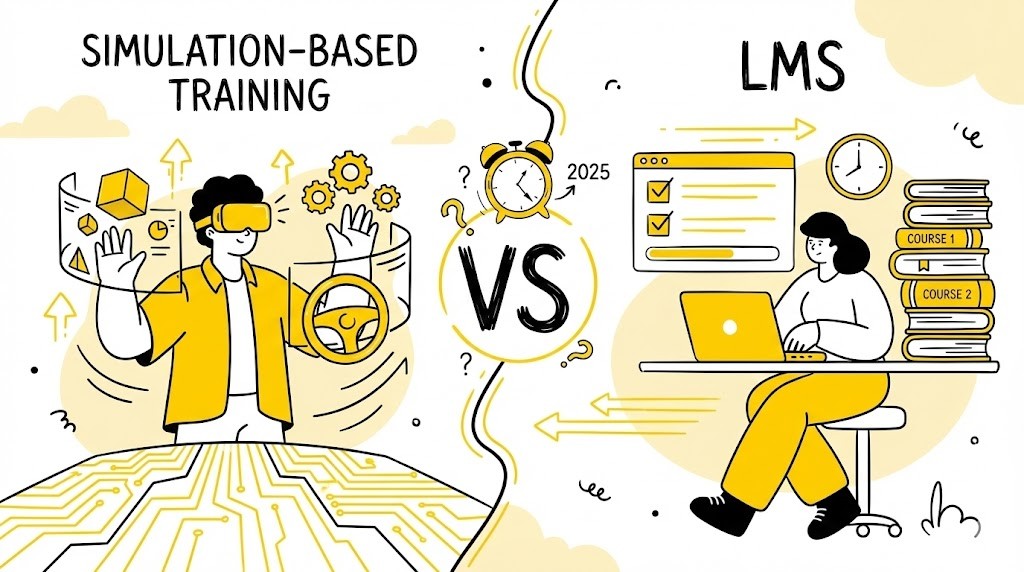
Simulation-Based Training vs LMS: Which Is Best in 2026?
/ / / / / / / /
Digital learning has transformed how organisations train their teams, especially in fast-paced sectors like customer support and BPO. As technology advances, two approaches dominate the conversation: simulation-based training and learning management systems (LMS). Both offer unique advantages, but choosing the right one can directly impact employee performance, engagement, and business outcomes.
For leaders in customer support, BPO, and other high-stakes environments, understanding the differences between simulation-based training and LMS is crucial. This guide breaks down each method, compares their strengths, and provides actionable advice for selecting the best fit for your team in 2026.
TL;DR: Key Takeaways
• Simulation-based training delivers immersive, hands-on learning for real-world skills.
• LMS platforms manage, deliver, and track digital learning content at scale.
• Simulations boost engagement and retention; LMSs excel at compliance and standardisation.
• Hybrid approaches often yield the best results.
• ROI depends on your goals, audience, and industry.
What Is Simulation-Based Training?
Simulation-based training is a digital learning approach where learners interact with realistic scenarios that mimic actual job tasks or challenges. Instead of passively consuming information, participants actively practise skills in a safe, controlled environment.
Core Principles
• Active learning: Learners make decisions and experience consequences.
• Realism: Scenarios closely mirror real-world situations.
• Feedback: Immediate, actionable feedback helps reinforce correct behaviours.
• Repetition: Learners can practise until they achieve proficiency.
These principles ensure that the training process moves beyond theory and delivers measurable improvements in operational capacity—vital for enterprises with complex workflows or customer-facing teams.
Types of Simulation-Based Training
(1) Scenario-based simulations: Text or video-driven branching scenarios (e.g., handling a difficult customer).
(2) Role-play simulations: Learners act out roles, often with AI or peer feedback.
(3) Virtual reality (VR) simulations: Immersive 3D environments for high-fidelity practice (e.g., medical procedures).
(4) AI-driven simulations: Adaptive, data-powered scenarios that adjust to learner performance (e.g., Smart Role’s AI coaching for support agents).
For example, a banking support team may use scenario-based simulations to practise responding to account fraud, while VR environments can train field safety teams for hazardous situations.
Typical Use Cases
• Customer support: Handling complaints, upselling, de-escalation.
• Healthcare: Clinical procedures, emergency response.
• Aviation: Flight simulators, safety drills.
• Sales: Objection handling, negotiation practice.
These use cases enable staff to hone critical thinking, apply structured problem-solving, and react to rare but high-impact events in a controlled environment.
Key Features and Technologies
• Interactive scenario design tools
• Real-time analytics and feedback
• Integration with AI for adaptive learning
• Compatibility with VR/AR hardware (for immersive experiences)
• Performance tracking and reporting
Additionally, modern simulation platforms can support compliance tracking and integrate with security frameworks—critical factors for regulated industries. Features like granular analytics empower managers to identify skills gaps and fine-tune coaching interventions.
Simulation-based training is especially effective for roles requiring complex decision-making, soft skills, or high-stakes performance (Source: Training Industry, 2025)
What Is a Learning Management System (LMS)?
A Learning Management System (LMS) is a software platform that manages, delivers, and tracks digital learning content. LMSs are the backbone of most corporate e-learning programmes, providing a central hub for training materials, assessments, and reporting.
Primary Functions
• Content hosting: Store and organise courses, videos, documents, and quizzes.
• User management: Enrol learners, assign courses, track progress.
• Assessment: Deliver tests, quizzes, and surveys.
• Reporting: Generate analytics on completion rates, scores, and compliance.
LMSs are designed to handle high volumes of users, automate recurring processes, and maintain training records for audits or regulatory compliance.
Common Features
• Course authoring or integration with authoring tools
• Automated reminders and notifications
• Certification and compliance tracking
• Mobile accessibility
• Integration with HR and other business systems
Advanced LMS platforms allow you to create custom learning paths, microlearning modules, and even include interactive content. Integration with HRIS or talent management systems enables seamless onboarding and compliance reporting.
Typical Use Cases
• Compliance training: Regulatory or mandatory courses (e.g., GDPR, health & safety).
• Onboarding: Standardised induction programmes for new hires.
• General e-learning: Product knowledge, soft skills, technical skills.
For example, a global BPO may use an LMS to ensure new hires complete anti-bribery training across offices, or a tech company may onboard software engineers globally with role-specific learning paths.
Popular LMS Platforms
• Moodle
• SAP SuccessFactors
• Cornerstone OnDemand
• Docebo
• TalentLMS
LMS platforms are valued for their scalability, standardisation, and ability to centralise learning across large organisations (Source: [Gartner, 2025](https://www.gartner.com/en/information-technology/glossary/learning-management-system-lms)).
Simulation-Based Training vs LMS: Key Differences
Understanding the distinctions between simulation-based training and LMS is essential for making informed decisions.
Here’s a side-by-side comparison:
(1) Learning Experience
• Simulation-based training: Highly interactive, immersive, and learner-driven. Participants practise real-world tasks, make decisions, and see outcomes. For example, a support agent can face a simulated irate customer and test de-escalation strategies.
• LMS: Primarily content delivery and assessment. Learning is often linear and passive (e.g., watching videos, reading slides, taking quizzes).
(2) Engagement and Motivation
• Simulations: Foster higher engagement through active participation and gamification elements. Learners are intrinsically motivated by overcoming realistic challenges.
• LMS: Engagement depends on content design; can be less motivating if limited to static materials.
(3) Personalisation and Adaptability
• Simulations: AI-driven simulations adapt to learner responses, offering tailored feedback and challenge levels.
• LMS: Personalisation is possible but often limited to course recommendations or learning paths. Learners may progress at their own pace, but the content itself is less dynamic.
(4) Assessment Methods
• Simulations: Real-time, performance-based assessment. Learners receive instant feedback and can repeat scenarios.
• LMS: Traditional assessments (quizzes, tests, surveys) with delayed or automated feedback.
(5) Scalability and Implementation
• Simulations: Require more upfront design and technical resources, but modern platforms offer scalable, cloud-based solutions. New templates and reusable scenarios reduce time-to-launch in subsequent rollouts.
• LMS: Highly scalable for content delivery; easy to roll out across global teams. Supports version control and synchronous or asynchronous delivery.
(6) Cost and Resource Requirements
• Simulations: Higher initial investment for scenario design and technology, but greater long-term impact for skill-based roles. Maintenance involves scenario updates and analytics-driven improvements.
• LMS: Lower setup costs; ideal for standardised, knowledge-based training. Costs scale predictably by user count, storage, and features.
Quick Comparison
• Interactivity: Simulation-Based Training = High; LMS = Low–Medium
• Realism: Simulation-Based Training = High; LMS = Low
• Feedback: Simulation-Based Training = Immediate, contextual; LMS = Delayed, generic
• Scalability: Simulation-Based Training = Medium–High (modern tools); LMS = High
• Cost: Simulation-Based Training = Higher upfront; LMS = Lower upfront
• Best for: Simulation-Based Training = Skills, behaviours; LMS = Knowledge, compliance
Checklist: Choosing Between Simulation-Based Training and LMS
• [ ] Do learners need to practise real-world scenarios?
• [ ] Is skill application more important than knowledge recall?
• [ ] Is immediate, personalised feedback critical?
• [ ] Are you training for compliance or complex decision-making?
• [ ] What is your budget and timeline?
Benefits of Simulation-Based Training
Simulation-based training offers several advantages, especially for roles where practical skills and decision-making are crucial.
(1) Improved Knowledge Retention and Skill Transfer
Learners retain up to 75% of skills through practice-based methods, compared to just 10% from reading or lectures (Source: [TD.org, 2025](https://www.td.org/insights/simulation-based-training-what-makes-it-effective)). This is particularly significant for BPOs or CX teams dealing with novel customer problems or escalations, where knowledge alone does not suffice.
(2) Safe Environment for Practice and Mistakes
Simulations allow employees to make mistakes without real-world consequences, building confidence and competence. For example, agents can role-play regulatory disclosures or data privacy actions safely, reducing costly compliance errors.
(3) Real-World Scenario Preparation
By mirroring actual job challenges, simulations prepare learners for what they’ll face on the job—reducing ramp-up time and errors. Scenario libraries can be updated as new business situations emerge, ensuring ongoing relevance.
(4) Enhanced Engagement and Motivation
Gamification, branching scenarios, and immediate feedback keep learners motivated and invested in their development. Leaderboards or achievement badges further drive positive competition and self-motivation.
Simulation Success Framework
(1) Define key skills and behaviours to practise, using competency models or performance metrics as a reference.
(2) Design realistic, branching scenarios with clear success/failure paths.
(3) Integrate real-time feedback, including AI-driven coaching and remediation.
(4) Track performance at both the individual and cohort level, using analytics to identify learning bottlenecks.
(5) Reinforce learning with spaced repetition, periodic refreshers, and performance-based unlocks.
Simulation-based training is particularly effective for customer support, healthcare, and any field where soft skills and judgement are essential (Source: [eLearning Industry, 2025](https://elearningindustry.com/benefits-of-simulation-based-training-in-corporate-learning)).
Benefits of LMS Platforms
LMS platforms remain the backbone of corporate learning for good reason. Their strengths include:
(1) Centralised Content Management
All learning materials, assessments, and records are stored in one place, simplifying administration and updates. This is critical in regulated industries where version control and reporting are heavily audited.
(2) Scalability and Accessibility
LMSs can deliver training to thousands of users across locations, devices, and time zones. Cloud-based LMSs ensure access to learning resources at any time, supporting hybrid and remote workforces.
(3) Standardised Tracking and Reporting
Automated analytics provide insights into completion rates, assessment scores, and compliance status. Built-in dashboards help L&D leaders identify teams or individuals who are falling behind.
(4) Compliance and Certification Management
LMSs streamline mandatory training and certification processes, reducing legal and regulatory risks. Recertification workflows, escalation policies, and digital certificates can be automated and centrally tracked.
LMS Checklist for Enterprises/BPOs:
• [ ] Verify integration with HRIS or other business software.
• [ ] Ensure support for multiple languages and localisation.
• [ ] Check reporting granularity (team, region, business unit).
• [ ] Confirm mobile and offline accessibility for distributed teams.
For organisations with large, distributed teams or strict compliance requirements, LMSs are indispensable (Source: [CIPD, 2025](https://www.cipd.org/en/knowledge/factsheets/learning-management-systems-factsheet/)).
When to Use Simulation-Based Training vs LMS
Choosing the right approach depends on your objectives, audience, and resources.
Decision Criteria
• Learning objectives: Use simulations for skill mastery and behaviour change; LMS for knowledge transfer and compliance.
• Audience: Simulations suit roles needing hands-on practice (e.g., support agents, clinicians); LMS fits broad, standardised training.
• Budget: Simulations require more upfront investment; LMS is cost-effective for large-scale, basic training.
• Complexity: Simulations handle complex, dynamic scenarios; LMS is ideal for structured, linear content.
Practical Example:
A manufacturing BPO implements simulation-based safety drills for supervisors (to practise hazard identification) but uses the LMS for standard product training and ISO procedure reminders.
Hybrid Approaches
Many organisations combine both methods—embedding simulations within an LMS for the best of both worlds. For example, Smart Role’s simulation modules can be launched from an LMS, with results tracked centrally: [Internal: /product/quality-review](/product/quality-review). This allows for a seamless user experience and consolidated analytics.
Industry-Specific Recommendations
• Customer support/BPO: Simulations for call handling, empathy, and escalation; LMS for policies and compliance [Internal: /blog/call-center-scripts](/blog/call-center-scripts).
• Healthcare: Simulations for procedures and emergencies; LMS for protocols and documentation.
• Sales: Simulations for negotiation; LMS for product knowledge.
Checklist: Blending Simulations and LMS
• [ ] Identify critical skills that require practice (e.g., complaint resolution, technical troubleshooting).
• [ ] Map compliance and knowledge needs to LMS modules.
• [ ] Integrate simulation results into LMS reporting for holistic reviews.
• [ ] Use analytics to refine both approaches and close skill/knowledge gaps as they are uncovered.
ROI and Effectiveness: What the Research Says
Comparative Studies
A 2021 meta-analysis found simulation-based training led to significantly higher skill acquisition and retention than traditional e-learning (Source: [NCBI, 2021](https://www.ncbi.nlm.nih.gov/pmc/articles/PMC7969418/)). In customer support, companies using simulations reported up to 30% faster onboarding and 20% fewer errors (Source: [Deloitte, 2023](https://www2.deloitte.com/us/en/insights/focus/technology-and-the-future-of-work/virtual-reality-training-simulation.html)).
Cost-Benefit Analysis
• Simulations: Higher initial costs, but greater long-term savings through reduced mistakes, faster ramp-up, and improved performance. For example, a BPO that reduces error rates can avoid costly repeat calls and higher customer churn.
• LMS: Lower upfront costs, scalable for compliance and knowledge training. Ideal for large enterprises where ongoing regulatory updates are frequent.
Real-World Case Studies
• A global BPO reduced average handle time by 15% after implementing simulation-based call training.
• A healthcare provider cut onboarding time by 25% using blended simulation and LMS modules.
• In a sales organisation, embedding negotiation simulations into the LMS drove a measurable increase in quota attainment rates over three quarters.
The most effective programmes often blend both approaches, leveraging simulations for skill mastery and LMS for knowledge and compliance.
Implementation Considerations
Rolling out simulation-based training or an LMS requires careful planning.
Technical Requirements and Integration
• Ensure compatibility with existing HR and IT systems, such as identity management or payroll.
• For simulations, check hardware needs (e.g., VR headsets) and bandwidth, especially for multimedia-heavy modules.
• Use platforms that support integration (e.g., SCORM, xAPI) to enable seamless reporting and single sign-on (SSO).
Change Management and User Adoption
• Communicate benefits to stakeholders early—align with business goals.
• Provide training and support for new tools, possibly pairing champions with early adopters.
• Gather feedback and iterate, using engagement metrics to adjust rollout strategies.
Vendor Selection Tips
• Assess experience in your industry: ask for customer references and deployment use cases.
• Check for AI and analytics capabilities that drive actionable feedback and continuous improvement.
• Review security certifications (e.g., SOC 2 Type 2, ISO), especially if handling sensitive customer or employee data.
Measuring Success
• Define KPIs: skill improvement, error rates, completion times, and business impact metrics (e.g., CSAT, NPS).
• Use analytics dashboards to track progress across teams, functions, or regions.
• Regularly review and update content; leverage feedback loops for content or scenario refinement.
Future Trends in Digital Training
The digital learning landscape is evolving rapidly. Key trends for 2026 include:
AI and Adaptive Learning
AI-powered simulations and LMSs deliver personalised learning paths, real-time coaching, and predictive analytics (Source: [Forbes, 2025](https://www.forbes.com/sites/forbestechcouncil/2021/07/27/the-future-of-learning-management-systems/)). These technologies will allow managers to allocate focused interventions for individuals or teams who need support most.
Immersive Technologies (AR/VR)
VR and AR simulations offer ultra-realistic practice environments, especially in healthcare and technical fields. For example, field engineers can rehearse rare or hazardous procedures virtually before attempting them onsite.
Gamification and Microlearning
Short, game-like modules boost engagement and retention, fitting modern attention spans. Microlearning also supports mobile-first strategies, which are essential as distributed and gig teams become more common.
The Evolving Role of LMS and Simulations
LMSs are integrating more simulation and AI features, while simulation platforms are adding LMS-like tracking and reporting. The future is blended, adaptive, and data-driven, with an emphasis on real performance outcomes rather than completion alone.
Choosing the Right Approach for Your Team
Simulation-based training and LMS platforms each have unique strengths. For skill mastery and engagement, simulations are unmatched. For scale, compliance, and standardisation, LMSs are essential. Most organisations benefit from a blended approach—leveraging simulations for practice and LMSs for content management. Assess your goals, audience, and resources to build a future-ready learning strategy.
Interested in AI-powered simulation training or automated QA for your support team? Explore how Smart Role can help.
FAQ
What is the main difference between simulation-based training and an LMS?
Simulation-based training offers immersive, interactive experiences for skill development, while an LMS manages, delivers, and tracks learning content.
Can simulation-based training be integrated into an LMS?
Yes, many organisations integrate simulations within their LMS to combine immersive learning with centralised tracking and reporting.
Which is more effective for customer support teams: simulation-based training or LMS?
Simulation-based training is often more effective for customer support teams as it enables realistic practice and skill application, though LMSs are valuable for foundational knowledge.
How do I measure the ROI of simulation-based training?
ROI can be measured by tracking performance improvements, reduced errors, faster onboarding, and comparing costs to traditional training methods.
Sources
• [TD.org](https://www.td.org/insights/simulation-based-training-what-makes-it-effective)
• [Training Industry](https://www.trainingindustry.com/wiki/entries/simulation-based-training/)
• [SHRM](https://www.shrm.org/resourcesandtools/hr-topics/organizational-and-employee-development/pages/learning-management-systems.aspx)
• [eLearning Industry](https://elearningindustry.com/benefits-of-simulation-based-training-in-corporate-learning)
• [NCBI](https://www.ncbi.nlm.nih.gov/pmc/articles/PMC7969418/)
• [Gartner](https://www.gartner.com/en/information-technology/glossary/learning-management-system-lms)
• [Forbes](https://www.forbes.com/sites/forbestechcouncil/2021/07/27/the-future-of-learning-management-systems/)
• [ResearchGate](https://www.researchgate.net/publication/343388964_Effectiveness_of_Simulation-Based_Training)
• [CIPD](https://www.cipd.org/en/knowledge/factsheets/learning-management-systems-factsheet/)
• [Deloitte](https://www2.deloitte.com/us/en/insights/focus/technology-and-the-future-of-work/virtual-reality-training-simulation.html)
About the author
Thibaut Martin is the COO at Smart Role, specialising in AI-driven training for support agents and BPOs. With previous leadership roles at Google and Otrium, Thibaut brings over a decade of expertise in customer experience, digital learning, and operational excellence. Smart Role is a SOC 2 Type 2 and ISO certified company, committed to secure, high-quality training solutions.
Digital learning has transformed how organisations train their teams, especially in fast-paced sectors like customer support and BPO. As technology advances, two approaches dominate the conversation: simulation-based training and learning management systems (LMS). Both offer unique advantages, but choosing the right one can directly impact employee performance, engagement, and business outcomes.
For leaders in customer support, BPO, and other high-stakes environments, understanding the differences between simulation-based training and LMS is crucial. This guide breaks down each method, compares their strengths, and provides actionable advice for selecting the best fit for your team in 2026.
TL;DR: Key Takeaways
• Simulation-based training delivers immersive, hands-on learning for real-world skills.
• LMS platforms manage, deliver, and track digital learning content at scale.
• Simulations boost engagement and retention; LMSs excel at compliance and standardisation.
• Hybrid approaches often yield the best results.
• ROI depends on your goals, audience, and industry.
What Is Simulation-Based Training?
Simulation-based training is a digital learning approach where learners interact with realistic scenarios that mimic actual job tasks or challenges. Instead of passively consuming information, participants actively practise skills in a safe, controlled environment.
Core Principles
• Active learning: Learners make decisions and experience consequences.
• Realism: Scenarios closely mirror real-world situations.
• Feedback: Immediate, actionable feedback helps reinforce correct behaviours.
• Repetition: Learners can practise until they achieve proficiency.
These principles ensure that the training process moves beyond theory and delivers measurable improvements in operational capacity—vital for enterprises with complex workflows or customer-facing teams.
Types of Simulation-Based Training
(1) Scenario-based simulations: Text or video-driven branching scenarios (e.g., handling a difficult customer).
(2) Role-play simulations: Learners act out roles, often with AI or peer feedback.
(3) Virtual reality (VR) simulations: Immersive 3D environments for high-fidelity practice (e.g., medical procedures).
(4) AI-driven simulations: Adaptive, data-powered scenarios that adjust to learner performance (e.g., Smart Role’s AI coaching for support agents).
For example, a banking support team may use scenario-based simulations to practise responding to account fraud, while VR environments can train field safety teams for hazardous situations.
Typical Use Cases
• Customer support: Handling complaints, upselling, de-escalation.
• Healthcare: Clinical procedures, emergency response.
• Aviation: Flight simulators, safety drills.
• Sales: Objection handling, negotiation practice.
These use cases enable staff to hone critical thinking, apply structured problem-solving, and react to rare but high-impact events in a controlled environment.
Key Features and Technologies
• Interactive scenario design tools
• Real-time analytics and feedback
• Integration with AI for adaptive learning
• Compatibility with VR/AR hardware (for immersive experiences)
• Performance tracking and reporting
Additionally, modern simulation platforms can support compliance tracking and integrate with security frameworks—critical factors for regulated industries. Features like granular analytics empower managers to identify skills gaps and fine-tune coaching interventions.
Simulation-based training is especially effective for roles requiring complex decision-making, soft skills, or high-stakes performance (Source: Training Industry, 2025)
What Is a Learning Management System (LMS)?
A Learning Management System (LMS) is a software platform that manages, delivers, and tracks digital learning content. LMSs are the backbone of most corporate e-learning programmes, providing a central hub for training materials, assessments, and reporting.
Primary Functions
• Content hosting: Store and organise courses, videos, documents, and quizzes.
• User management: Enrol learners, assign courses, track progress.
• Assessment: Deliver tests, quizzes, and surveys.
• Reporting: Generate analytics on completion rates, scores, and compliance.
LMSs are designed to handle high volumes of users, automate recurring processes, and maintain training records for audits or regulatory compliance.
Common Features
• Course authoring or integration with authoring tools
• Automated reminders and notifications
• Certification and compliance tracking
• Mobile accessibility
• Integration with HR and other business systems
Advanced LMS platforms allow you to create custom learning paths, microlearning modules, and even include interactive content. Integration with HRIS or talent management systems enables seamless onboarding and compliance reporting.
Typical Use Cases
• Compliance training: Regulatory or mandatory courses (e.g., GDPR, health & safety).
• Onboarding: Standardised induction programmes for new hires.
• General e-learning: Product knowledge, soft skills, technical skills.
For example, a global BPO may use an LMS to ensure new hires complete anti-bribery training across offices, or a tech company may onboard software engineers globally with role-specific learning paths.
Popular LMS Platforms
• Moodle
• SAP SuccessFactors
• Cornerstone OnDemand
• Docebo
• TalentLMS
LMS platforms are valued for their scalability, standardisation, and ability to centralise learning across large organisations (Source: [Gartner, 2025](https://www.gartner.com/en/information-technology/glossary/learning-management-system-lms)).
Simulation-Based Training vs LMS: Key Differences
Understanding the distinctions between simulation-based training and LMS is essential for making informed decisions.
Here’s a side-by-side comparison:
(1) Learning Experience
• Simulation-based training: Highly interactive, immersive, and learner-driven. Participants practise real-world tasks, make decisions, and see outcomes. For example, a support agent can face a simulated irate customer and test de-escalation strategies.
• LMS: Primarily content delivery and assessment. Learning is often linear and passive (e.g., watching videos, reading slides, taking quizzes).
(2) Engagement and Motivation
• Simulations: Foster higher engagement through active participation and gamification elements. Learners are intrinsically motivated by overcoming realistic challenges.
• LMS: Engagement depends on content design; can be less motivating if limited to static materials.
(3) Personalisation and Adaptability
• Simulations: AI-driven simulations adapt to learner responses, offering tailored feedback and challenge levels.
• LMS: Personalisation is possible but often limited to course recommendations or learning paths. Learners may progress at their own pace, but the content itself is less dynamic.
(4) Assessment Methods
• Simulations: Real-time, performance-based assessment. Learners receive instant feedback and can repeat scenarios.
• LMS: Traditional assessments (quizzes, tests, surveys) with delayed or automated feedback.
(5) Scalability and Implementation
• Simulations: Require more upfront design and technical resources, but modern platforms offer scalable, cloud-based solutions. New templates and reusable scenarios reduce time-to-launch in subsequent rollouts.
• LMS: Highly scalable for content delivery; easy to roll out across global teams. Supports version control and synchronous or asynchronous delivery.
(6) Cost and Resource Requirements
• Simulations: Higher initial investment for scenario design and technology, but greater long-term impact for skill-based roles. Maintenance involves scenario updates and analytics-driven improvements.
• LMS: Lower setup costs; ideal for standardised, knowledge-based training. Costs scale predictably by user count, storage, and features.
Quick Comparison
• Interactivity: Simulation-Based Training = High; LMS = Low–Medium
• Realism: Simulation-Based Training = High; LMS = Low
• Feedback: Simulation-Based Training = Immediate, contextual; LMS = Delayed, generic
• Scalability: Simulation-Based Training = Medium–High (modern tools); LMS = High
• Cost: Simulation-Based Training = Higher upfront; LMS = Lower upfront
• Best for: Simulation-Based Training = Skills, behaviours; LMS = Knowledge, compliance
Checklist: Choosing Between Simulation-Based Training and LMS
• [ ] Do learners need to practise real-world scenarios?
• [ ] Is skill application more important than knowledge recall?
• [ ] Is immediate, personalised feedback critical?
• [ ] Are you training for compliance or complex decision-making?
• [ ] What is your budget and timeline?
Benefits of Simulation-Based Training
Simulation-based training offers several advantages, especially for roles where practical skills and decision-making are crucial.
(1) Improved Knowledge Retention and Skill Transfer
Learners retain up to 75% of skills through practice-based methods, compared to just 10% from reading or lectures (Source: [TD.org, 2025](https://www.td.org/insights/simulation-based-training-what-makes-it-effective)). This is particularly significant for BPOs or CX teams dealing with novel customer problems or escalations, where knowledge alone does not suffice.
(2) Safe Environment for Practice and Mistakes
Simulations allow employees to make mistakes without real-world consequences, building confidence and competence. For example, agents can role-play regulatory disclosures or data privacy actions safely, reducing costly compliance errors.
(3) Real-World Scenario Preparation
By mirroring actual job challenges, simulations prepare learners for what they’ll face on the job—reducing ramp-up time and errors. Scenario libraries can be updated as new business situations emerge, ensuring ongoing relevance.
(4) Enhanced Engagement and Motivation
Gamification, branching scenarios, and immediate feedback keep learners motivated and invested in their development. Leaderboards or achievement badges further drive positive competition and self-motivation.
Simulation Success Framework
(1) Define key skills and behaviours to practise, using competency models or performance metrics as a reference.
(2) Design realistic, branching scenarios with clear success/failure paths.
(3) Integrate real-time feedback, including AI-driven coaching and remediation.
(4) Track performance at both the individual and cohort level, using analytics to identify learning bottlenecks.
(5) Reinforce learning with spaced repetition, periodic refreshers, and performance-based unlocks.
Simulation-based training is particularly effective for customer support, healthcare, and any field where soft skills and judgement are essential (Source: [eLearning Industry, 2025](https://elearningindustry.com/benefits-of-simulation-based-training-in-corporate-learning)).
Benefits of LMS Platforms
LMS platforms remain the backbone of corporate learning for good reason. Their strengths include:
(1) Centralised Content Management
All learning materials, assessments, and records are stored in one place, simplifying administration and updates. This is critical in regulated industries where version control and reporting are heavily audited.
(2) Scalability and Accessibility
LMSs can deliver training to thousands of users across locations, devices, and time zones. Cloud-based LMSs ensure access to learning resources at any time, supporting hybrid and remote workforces.
(3) Standardised Tracking and Reporting
Automated analytics provide insights into completion rates, assessment scores, and compliance status. Built-in dashboards help L&D leaders identify teams or individuals who are falling behind.
(4) Compliance and Certification Management
LMSs streamline mandatory training and certification processes, reducing legal and regulatory risks. Recertification workflows, escalation policies, and digital certificates can be automated and centrally tracked.
LMS Checklist for Enterprises/BPOs:
• [ ] Verify integration with HRIS or other business software.
• [ ] Ensure support for multiple languages and localisation.
• [ ] Check reporting granularity (team, region, business unit).
• [ ] Confirm mobile and offline accessibility for distributed teams.
For organisations with large, distributed teams or strict compliance requirements, LMSs are indispensable (Source: [CIPD, 2025](https://www.cipd.org/en/knowledge/factsheets/learning-management-systems-factsheet/)).
When to Use Simulation-Based Training vs LMS
Choosing the right approach depends on your objectives, audience, and resources.
Decision Criteria
• Learning objectives: Use simulations for skill mastery and behaviour change; LMS for knowledge transfer and compliance.
• Audience: Simulations suit roles needing hands-on practice (e.g., support agents, clinicians); LMS fits broad, standardised training.
• Budget: Simulations require more upfront investment; LMS is cost-effective for large-scale, basic training.
• Complexity: Simulations handle complex, dynamic scenarios; LMS is ideal for structured, linear content.
Practical Example:
A manufacturing BPO implements simulation-based safety drills for supervisors (to practise hazard identification) but uses the LMS for standard product training and ISO procedure reminders.
Hybrid Approaches
Many organisations combine both methods—embedding simulations within an LMS for the best of both worlds. For example, Smart Role’s simulation modules can be launched from an LMS, with results tracked centrally: [Internal: /product/quality-review](/product/quality-review). This allows for a seamless user experience and consolidated analytics.
Industry-Specific Recommendations
• Customer support/BPO: Simulations for call handling, empathy, and escalation; LMS for policies and compliance [Internal: /blog/call-center-scripts](/blog/call-center-scripts).
• Healthcare: Simulations for procedures and emergencies; LMS for protocols and documentation.
• Sales: Simulations for negotiation; LMS for product knowledge.
Checklist: Blending Simulations and LMS
• [ ] Identify critical skills that require practice (e.g., complaint resolution, technical troubleshooting).
• [ ] Map compliance and knowledge needs to LMS modules.
• [ ] Integrate simulation results into LMS reporting for holistic reviews.
• [ ] Use analytics to refine both approaches and close skill/knowledge gaps as they are uncovered.
ROI and Effectiveness: What the Research Says
Comparative Studies
A 2021 meta-analysis found simulation-based training led to significantly higher skill acquisition and retention than traditional e-learning (Source: [NCBI, 2021](https://www.ncbi.nlm.nih.gov/pmc/articles/PMC7969418/)). In customer support, companies using simulations reported up to 30% faster onboarding and 20% fewer errors (Source: [Deloitte, 2023](https://www2.deloitte.com/us/en/insights/focus/technology-and-the-future-of-work/virtual-reality-training-simulation.html)).
Cost-Benefit Analysis
• Simulations: Higher initial costs, but greater long-term savings through reduced mistakes, faster ramp-up, and improved performance. For example, a BPO that reduces error rates can avoid costly repeat calls and higher customer churn.
• LMS: Lower upfront costs, scalable for compliance and knowledge training. Ideal for large enterprises where ongoing regulatory updates are frequent.
Real-World Case Studies
• A global BPO reduced average handle time by 15% after implementing simulation-based call training.
• A healthcare provider cut onboarding time by 25% using blended simulation and LMS modules.
• In a sales organisation, embedding negotiation simulations into the LMS drove a measurable increase in quota attainment rates over three quarters.
The most effective programmes often blend both approaches, leveraging simulations for skill mastery and LMS for knowledge and compliance.
Implementation Considerations
Rolling out simulation-based training or an LMS requires careful planning.
Technical Requirements and Integration
• Ensure compatibility with existing HR and IT systems, such as identity management or payroll.
• For simulations, check hardware needs (e.g., VR headsets) and bandwidth, especially for multimedia-heavy modules.
• Use platforms that support integration (e.g., SCORM, xAPI) to enable seamless reporting and single sign-on (SSO).
Change Management and User Adoption
• Communicate benefits to stakeholders early—align with business goals.
• Provide training and support for new tools, possibly pairing champions with early adopters.
• Gather feedback and iterate, using engagement metrics to adjust rollout strategies.
Vendor Selection Tips
• Assess experience in your industry: ask for customer references and deployment use cases.
• Check for AI and analytics capabilities that drive actionable feedback and continuous improvement.
• Review security certifications (e.g., SOC 2 Type 2, ISO), especially if handling sensitive customer or employee data.
Measuring Success
• Define KPIs: skill improvement, error rates, completion times, and business impact metrics (e.g., CSAT, NPS).
• Use analytics dashboards to track progress across teams, functions, or regions.
• Regularly review and update content; leverage feedback loops for content or scenario refinement.
Future Trends in Digital Training
The digital learning landscape is evolving rapidly. Key trends for 2026 include:
AI and Adaptive Learning
AI-powered simulations and LMSs deliver personalised learning paths, real-time coaching, and predictive analytics (Source: [Forbes, 2025](https://www.forbes.com/sites/forbestechcouncil/2021/07/27/the-future-of-learning-management-systems/)). These technologies will allow managers to allocate focused interventions for individuals or teams who need support most.
Immersive Technologies (AR/VR)
VR and AR simulations offer ultra-realistic practice environments, especially in healthcare and technical fields. For example, field engineers can rehearse rare or hazardous procedures virtually before attempting them onsite.
Gamification and Microlearning
Short, game-like modules boost engagement and retention, fitting modern attention spans. Microlearning also supports mobile-first strategies, which are essential as distributed and gig teams become more common.
The Evolving Role of LMS and Simulations
LMSs are integrating more simulation and AI features, while simulation platforms are adding LMS-like tracking and reporting. The future is blended, adaptive, and data-driven, with an emphasis on real performance outcomes rather than completion alone.
Choosing the Right Approach for Your Team
Simulation-based training and LMS platforms each have unique strengths. For skill mastery and engagement, simulations are unmatched. For scale, compliance, and standardisation, LMSs are essential. Most organisations benefit from a blended approach—leveraging simulations for practice and LMSs for content management. Assess your goals, audience, and resources to build a future-ready learning strategy.
Interested in AI-powered simulation training or automated QA for your support team? Explore how Smart Role can help.
FAQ
What is the main difference between simulation-based training and an LMS?
Simulation-based training offers immersive, interactive experiences for skill development, while an LMS manages, delivers, and tracks learning content.
Can simulation-based training be integrated into an LMS?
Yes, many organisations integrate simulations within their LMS to combine immersive learning with centralised tracking and reporting.
Which is more effective for customer support teams: simulation-based training or LMS?
Simulation-based training is often more effective for customer support teams as it enables realistic practice and skill application, though LMSs are valuable for foundational knowledge.
How do I measure the ROI of simulation-based training?
ROI can be measured by tracking performance improvements, reduced errors, faster onboarding, and comparing costs to traditional training methods.
Sources
• [TD.org](https://www.td.org/insights/simulation-based-training-what-makes-it-effective)
• [Training Industry](https://www.trainingindustry.com/wiki/entries/simulation-based-training/)
• [SHRM](https://www.shrm.org/resourcesandtools/hr-topics/organizational-and-employee-development/pages/learning-management-systems.aspx)
• [eLearning Industry](https://elearningindustry.com/benefits-of-simulation-based-training-in-corporate-learning)
• [NCBI](https://www.ncbi.nlm.nih.gov/pmc/articles/PMC7969418/)
• [Gartner](https://www.gartner.com/en/information-technology/glossary/learning-management-system-lms)
• [Forbes](https://www.forbes.com/sites/forbestechcouncil/2021/07/27/the-future-of-learning-management-systems/)
• [ResearchGate](https://www.researchgate.net/publication/343388964_Effectiveness_of_Simulation-Based_Training)
• [CIPD](https://www.cipd.org/en/knowledge/factsheets/learning-management-systems-factsheet/)
• [Deloitte](https://www2.deloitte.com/us/en/insights/focus/technology-and-the-future-of-work/virtual-reality-training-simulation.html)
About the author
Thibaut Martin is the COO at Smart Role, specialising in AI-driven training for support agents and BPOs. With previous leadership roles at Google and Otrium, Thibaut brings over a decade of expertise in customer experience, digital learning, and operational excellence. Smart Role is a SOC 2 Type 2 and ISO certified company, committed to secure, high-quality training solutions.
Join the Smart Role newsletter

Success in customer service is 10% knowledge and 90% how you apply it in real situations.
Join the Smart Role newsletter
Success in customer service is 10% knowledge and 90% how you apply it in real situations.
Join the Smart Role newsletter
Success in customer service is 10% knowledge and 90% how you apply it in real situations.
Smart Role is the global standard for CX governance.
We provide the simulation infrastructure to scale customer support across internal and outsourced teams with zero compromise on quality.

Ask AI for a summary of Smart Role



Smart Role is the global standard for CX governance.
We provide the simulation infrastructure to scale customer support across internal and outsourced teams with zero compromise on quality.
Ask AI for a summary of Smart Role
Smart Role is the global standard for CX governance.
We provide the simulation infrastructure to scale customer support across internal and outsourced teams with zero compromise on quality.
Ask AI for a summary of Smart Role